Wednesday, May 30, 2012

New Canon imageFORMULA DR-C130


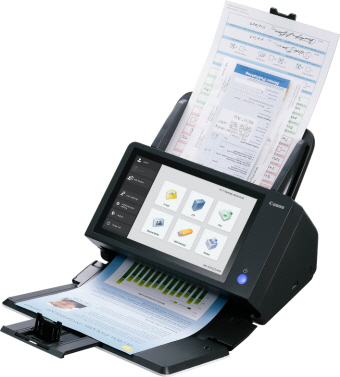
Easily integrate information into workflows with the Canon imageFORMULA DR-C130 document scanner. It reliably converts paper-based documents into high-quality digital images, and its compact footprint makes it ideal for any office environment.
FEATURES & ADVANTAGES
EASY USE
CaptureOnTouch
·         New User Interface
·          Full Auto Mode - Single click adjustment of multiple scanning features
·         Pre-configurable scan jobs (10) - Assigned to Scan-To-Job buttons
·         Cloud Scanning - Microsoft SharePoint, Evernote, Google Docs
·         ISIS/TWAIN Drivers

RELIABILITY
·         Ultrasonic Double-Feed Detection
·         Rapid Recovery
·         Double-Feed Release
·         Handle a wide variety of documents -Plastic ID or embossed cards, Driver licenses, Folio mode (11” x 17”), Long Document Mode (up to 118.1”)

HIGH QUALITY IMAGES
·         Background Smoothing
·         Auto Resolution Setting
·         Auto Color Detection with Gray Mode
·         Shadow Cropping
·         Character Emphasis
·         Advanced Deskew
·         Bundled Kofax VRS

COMPACT
·         Three-way eject tray design - Scan with tray closed, open or, half open
·         3.97 lb.
·         11.7” (H) x 6.3” (W) x 6.3” (D)

ENVIRONMENT IN MIND
·         Meets ENERGY STAR guidelines
·         Energy-Related Products (ErP) Directive Lot 6 compliant
·         EU RoHS Compliant
·         EU WEEE Compliant

CUSTOMER CARE 
·         One year warranty included – Exchange Service
·         Optional eCarePAK extended warranty available

Wednesday, April 18, 2012

New Kodak i5600V Scanner


Beyond smart lies brilliant: KODAK i5000V Scanners


These scanners deliver a revolution in document imaging intelligence, offering advances in value, volume and vision. Get the savings, smarts and speed you need for your enterprise with KODAK i5000V Series Scanners with Kofax VRS Professional software.

Best-in-class total cost of ownership/ performance


Process and manage more data per dollar than select competitors

Over five years, compared to select competitor scanners:
  • Save up to $100,000 on TCO*
  • Save up to $46,000 on consumables alone

Gain even more speed without additional hardware purchases


  • Field upgradeable versatility and savings
  • Transform a KODAK i5200V Scanner to KODAK i5600V specs and performance as your needs and volumes grow

Single component, touch screen panel efficiency


  • Make repeated and complex functions one-button-easy
  • Simplify tasks according to common job orders with programmable function keys
  • Minimize human interaction and time expended
  • Improve accuracy and processing times
  • Wide-angle viewing with two ergonomically correct positions
  • Vibrant, full-color touch screen

Give your documents the intelligence they deserve


Greatly increase processing volumes and accuracy to make informed decisions faster. Speed business processes. Deliver better customer service. It's intelligence and power for your documents and enterprise, designed for less human interaction from feeding...through imaging...to stacking.

  • i5200V Scanner—up to 140 ppm
  • i5600V Scanner—up to 170 ppm

Wednesday, December 14, 2011

Kodak ScanMate i920


The Small, But Powerful Way To Clear Off Your Desk 

The compact KODAK SCANMATE i920 Scanner saves desk space with its small footprint, and saves time by automating repetitive tasks. Plus, it creates crisp, clear images and easily readable text on the first scan. So you can make quick work of those unexpected scanning tasks. And get back to business.

With Kodak’s Smart Touch functionality, the KODAK SCANMATE i920 gets important business documents into your information network in an instant. That’s because Smart Touch automates multiple-step scanning operations by capturing, processing, and sending information for you. At the touch of a button, Smart Touch helps you make e-mail attachments, picture files, searchable PDFs, and more. Plus it files documents or sends them to “the cloud.”
Eight great things you can do with the KODAK SCANMATE i920 Scanner to get ahead.
  1. Save space - compact, highly portable design takes up less desk space
  2. Save time - Smart Touch performs multiple-step scanning and organizing operations automatically
  3. Make great images - Kodak’s Perfect Page document imaging is built in — just press the button and get great images with bright colors and crisp text
  4. Scan it all - reliably handles a wide range of documents with the 20-sheet automatic document feeder, including extra-long documents, business cards, ID cards, and embossed hard cards
  5. Stay in contact - Bundled software helps you easily edit and synchronize business card info with your contact applications
  6. Integrate easily - TWAIN and ISIS drivers allow quick compatibility with most scanning software
  7. Do more - KODAK Capture Pro Software lets you quickly scan, process, utilize, and manage documents - no third-party software to buy
  8. Get peace of mind - our three-year limited warranty supports Kodak’s commitment to superior workmanship
Features:
  • Recommended Daily Volume: Up to 500 pages per day
  • Optical Resolution: 600 dpi
  • Throughput Speeds: Black and White/Grayscale: up to 20 ppm/40 ipm at 200 dpi - Color: up to 15 ppm/30 ipm at 200 dpi
  • Feeder: ADF up to 20 sheets
  • Connectivity: USB 2.0
  • Bundled Software: TWAIN, ISIS, WIA drivers, Smart Touch & New Soft Presto! BizCard
  • Imaging Features: Perfect Page Scanning, iThresholding, automatic image straightening (deskew), auto cropping, image rotation, electronic color dropout, dual stream scanning, image merge, image edge fill, content-based blank page removal, automatic brightness and contrast
  • File Format Outputs: Single and mutli-page TIFF, JPEG, RTF, BMP, single and multi-page PDF, searchable PDF
  • Dimensions: Height: 78 mm (3.1 in.) with tray closed
    Width: 289 mm (11.4 in.) with tray closed
    Depth: 107 mm (4.2 in.) with tray closed
    Weight: 1.2 kg (2.7 lbs) without power
To order, please call us at  212-779-0800 or visit our website at www.1strunshoponline.com

Tuesday, November 8, 2011

New Canon P-215 Scan-tini


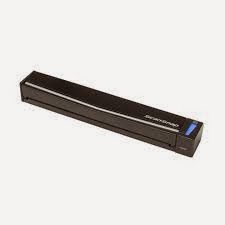
The P-215 Scan-tini personal document scanner is an ideal solution for both Windows and Mac environments.  Complete with a built-in card reader, the P-215 scanner’s compact size, simple use, and high quality imaging bring sophistication to mobile and portable information capture, storage, and collaboration.
The P-215 is the latest addition to Canon’s successful Scan-tini family of personal document scanners.  Scan-tini scanners are highly-portable and mobile, easy-to-use devices for individuals to use from the convenience of any location.  The P-215 brings to this family of devices new features and enhancements to advance and innovate distributed document capture.
P-215 User Applications: The P-215 scanner was designed to improve individual productivity anywhere, from the Small Office / Home Office (SOHO), to large enterprises, to classrooms, and traveling in between.  It can help meet the document capture needs of stationary users and “road warriors” in healthcare, financial services, government, and many other areas.    P-215 scanner users can conveniently execute general purpose, distributed scanning tasks to maximize business efficiencies.  Aside from its small size and light weight, the flexibility of the P-215 is seen in its back-end capabilities.  A comprehensive software suite allows for more forward-thinking end-to-end imaging solutions, and use in both Windows and Mac environments.  The P-215 was designed to raise the bar on mobile and portable document scanning in a rapidly evolving personal scanner segment.
P-215 Highlighted Abilities and Advantages:
• Built-in card reader to expand the types of documents that can be scanned to include embossed plastic cards
• Portable and mobile-11 inches long and just over two pounds–for document scanning efficiencies in any setting
• “Plug-and-Scan” without loading drivers or imaging applications for easy and instantaneous use
• Windows ISIS / TWAIN and Mac TWAIN drivers included for easy scanner sharing between users of either operating system
• Canon CaptureOnTouch, with a new user interface, to simplify scanning tasks and scan directly to cloud applications such as Microsoft SharePoint, Evernote, and Google Docs 
• Can achieve maximum speeds via a single USB cable, for more convenient scanning in and out of the office
• Scans up to 15 pages per minute and holds up to 20 documents in its ADF for further productivity
• Canon Generation Green program participation, plus EU RoHS and Energy Star regulatory compliances, for an environmentally conscious solution
• eCarePAK options are available for hardware investment protection


Please call: 212-779-0800 to order or visit our website: http://www.1strunshoponline.com


Tuesday, September 20, 2011

Free 2-Year Warranty on Select Panasonic Scanner Models!


Panasonic announced the availability of a free 2-Year Warranty on select scanner models purchased between July 1, 2011 and September 30, 2011.

This will extend the end-user’s standard 1-Year Advance Exchange warranty for 1 more year from the original expiration after registration of the scanner.
This free warranty is up to a $995 value!

Benefits of this warranty include:
 • No need to schedule service personnel
• Replacement unit is sent in advance – No waiting for the defective unit to be returned
• Reduced downtime – Up and running, in most cases, by the next business day

The following units, along with their –J (Government Model) and –V (VRS Elite Bundled Model) counterparts will be eligible for the 2-Year scanner warranty:
- KV-S1025C
- KV-S1045C
- KV-S2028C
- KV-S2048C
- KV-S3065CW
- KV-S3065CL
- KV-S4065CL
- KV-S4065CW
- KV-S5055C
- KV-S7075C

Promotion Terms and Conditions
1. Promotion valid for any quantity of scanner main units.
2. To claim the free extended warranty, please fill out the “Scanner Registration Form” which will be available on PSNAdealer.com.
3. Offer excludes any models not listed specifically above.
4. Offer valid July 1, 2011 through September 30, 2011.
5.Panasonic reserves the right to alter or cancel this promotion at any time.

To order a Panasonic document scanner please visit our website or call us at (212) 779-0800.

Thursday, September 8, 2011

New Canon imageFORMULA DR-M160 Document Scanner


Canon U.S.A, introduced the latest addition to its award-winning imageFORMULA lineup, the Canon DR-M160 document scanner. The Canon DR-M160 scanner has excellent performance and document capacity. Scanning up to 60 pages-per-minute / 120 images per minute, and holding up to 60 sheets in the Automatic Document Feeder, it quickly and effectively captures and stores business information, scanning both sides of a document in a single pass. At less than a foot long and wide, the DR-M160 scanner can help enhance the workflow in space-constrained areas. The Canon DR-M160 scanner includes improved gradation levels and capabilities such as Background Smoothing and Shadow Cropping, for high quality scanning that demonstrates Canon's imaging expertise.

The Canon DR-M160 scanner is bundled with Windows ISIS/TWAIN drivers for easy integration with third-party Enterprise Content Management (ECM) systems. With a combination of performance, convenience and flexibility, the Canon imageFORMULA DR-M160 scanner is a compact document imaging solution that is ideal for a variety of office environments.

To order this scanner please visit our website: http://www.1strunshoponline.com/canondr-m160scanner.aspx
or call us at 212-779-0800.