Wednesday, February 20, 2013

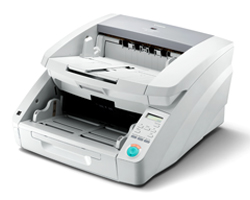
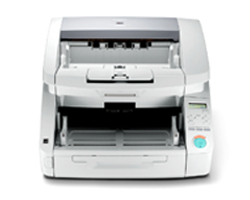
The New Canon imageFORMULA DR-G1130 and DR-G1100 Production Scanners


Canon announced the availability of the new imageFORMULA DR-G1130 production document scanner (item # 8073B002, MSRP $9975), and imageFORMULA DR-G1100 production document scanner (item # 8074B002, MSRP $6775), as of  February 27, 2013.  The Canon imageFORMULA DR-G1130 and DR-G1100 production document scanners provide businesses with high-performance, reliable, and flexible scanning solutions to help enhance document management systems.

DR-G1130 / DR-G1100 User Applications:

The DR-G1130 and DR-G1100 scanners are ideal for processing large amounts of documents in mission-critical, centralized production scanning environments.  They have been developed to withstand the rigors of production-level scanning, while maintaining high-speed, high-quality imaging.  These scanners will help companies improve productivity, maintain business continuity, and increase efficiencies.  Legal, government, financial, healthcare, and other industries can benefit from its use. 

DR-G1130 / DR-G1100 Highlighted Abilities and Advantages:

• Capable of single-pass duplex scanning, at up to 130 ppm (DR-G1130) / 100 ppm (DR-G1100), and include a 500-sheet ADF, and a dedicated, onboard, image processing chip, for high performance and improved productivity
• Can handle a variety of document types, from business cards to ledger-sized, thin or thick documents, and long documents, for flexible feeding and reduced job preparation time
• Will detect double-feeds and attempt to recover from them, and have a durable, solid-body design with heavy-duty trays, to increase reliability and minimize downtime
• Have an intuitive control panel for access to scanner settings and user-programmable jobs, for efficient, smooth operation
• Include features such as Character Emphasis, Text Enhancement, and an advanced Deskew function, as well as bundled Kofax Virtual ReScan (VRS), to provide high quality imaging
• ISIS and TWAIN drivers enable easy integration with third party capture or content management systems
• Meet ENERGY STAR® guidelines for energy efficiency, comply with the EU RoHS and WEEE directives, and are part of Canon’s Generation Green Program for an environmentally conscious choice
• eCarePAK extended service options are available for hardware investment protection


Visit 1strunshoponline.com to order.

Tuesday, January 8, 2013

Fujitsu Unveils Its Next Generation ScanSnap iX500 Desktop Scanner Incorporating “PC-Less” Scanning to Mobile Device Functionality


Control and Access Documents From the Palm of Your Hand With Your Smartphones and Tablets; Instantly Send Documents to the Cloud for Easy Organizing and Sharing


Sunnyvale, CA, January 7, 2013 — Fujitsu, the market leader in document imaging scanners, today introduced the newest addition to its award-winning ScanSnap product lineup – the next generation ScanSnap iX500 featuring built-in Wi-Fi connectivity giving customers the ability to scan directly to their Android™ and iOS compatible devices 1. Additionally, the ScanSnap iX500, for PC and Mac users, is enhanced with faster scanning speeds, a new advanced feeding system, an intelligent and customizable Quick Menu, and functionality allowing users to easily scan to cloud-based services such as Evernote, Google Docs™, Dropbox, SugarSync and Salesforce.
Equipped with a revolutionary “GI” image processer 2 inside the scanner, the ScanSnap iX500 is now empowered for today’s ever-increasing on-the-go lifestyle and mobile professional. Now, users can instantly scan and transmit PDF or JPEG files, such as contracts, receipts, bills, invoices and business cards, to their mobile devices without the use of a computer.
Utilizing the free “ScanSnap Connect” app on their mobile device or tablet, ScanSnap users achieve a whole new level of convenience in scanning; literally from the palm of their hand. With a simple push of a button, documents are scanned and saved to their mobile device ready to view, share or send to their favorite cloud service. The “ScanSnap Connect” app can be downloaded in the Google Play Store and the iTunes App Store and can be used with Android compatible tablets and smartphones running OS 2.23 and both the iPad and iPhone running iOS 4.3 or later.
“There’s a simple reason why ScanSnap is the top selling personal scanner on the market today – it continues to offer the most intelligent, powerful scanning tools to keep up with the growing demands of our customers,” said Scott Francis, senior vice president of marketing, Fujitsu Computer Products of America, Inc. “The ScanSnap iX500’s built-in GI processor allows you to scan and save optimized PDFs to your mobile device without the need for a PC, while its advanced productivity features allow consumers and business professionals to be even more productive and paperless anywhere, anytime. All of this functionality provides customers with the highest performance personal scanning experience combined with extremely easy operation. The iX500 truly pushes the performance bar to a new level.”
Powerful, Intelligent and Fast
The ScanSnap iX500, enhanced with USB 3.0 connectivity, provides the same easy-to-use one-button scanning and advanced imaging technology that customers have come to expect with ScanSnap, while also providing consumers and business professionals additional intuitive productivity features that no other document management company offers. New and innovative features of the ScanSnap iX500 include:
  • Faster Scanning Performance: Utilizing the increased power of its engine and “GI” image processor, the iX500 can create PDF files at speeds of up to 25 double-sided color pages per minute (300dpi, color) -- that’s 25 percent faster than its predecessor.
  • Advanced Document Feeding System: Inheriting the superior paper feeding technology driving the higher-end scanners from Fujitsu, the iX500 achieves exceptional feeding reliability using enhanced “Separation Roller” technology to maximize feeding reliability across an even wider range of documents and scanning situations.
  • Customizable Quick Menu: For additional convenience and flexibility, the ScanSnap Quick Menu is fully customizable and automatically appears after scanning providing a quick and easy way to send those scanned documents to several popular “Scan-To” applications. Furthermore, the Quick Menu incorporates new intelligence that anticipates the appropriate application while keeping users in the driver’s seat for easy and faithful disposition of content.
  • “ScanSnap Folder”: Stay in the moment and extend the power of one-button scanning into virtually any Windows application, even in the cloud, with the “ScanSnap Folder” function. This easy but powerful feature essentially replicates ScanSnap as a Windows folder which the user can open from their favorite software and web applications4 allowing them to scan into it without making complicated setting changes in ScanSnap or their application. It’s the ultimate in "Scan there!" versatility.
  • Cloud Services Support: Users can scan documents directly to Evernote, Google Docs, Dropbox, SugarSync and Salesforce Chatter from their Mac or PC, giving them even more flexibility to store, share and access their paperwork. Whether it is scanning contracts, bills, invoices, or business cards on the road or using a PC in one place and a Mac in another, consumers have the necessary tools to be even more productive and paperless virtually anywhere.
Additional Productivity Features
The ScanSnap iX500 comes with software for PC and software for Mac so users who use both can optimize their ScanSnap for either platform. In-box software includes:
  • ScanSnap Manager (PC & Mac): Provides PC and Mac users one button searchable PDF creation, access to intelligent features and custom scan settings (profiles) for simple operation with sophisticated results.
  • Scan-to Functions (PC & Mac): Offers users a flexible way to manage PDF, searchable PDF and JPEG files, providing them with an easy way to scan to a folder, attach scans to an email, send scans to a printer, as well as to a variety of cloud-based repositories like Evernote, Dropbox, and others.
  • Efficient Business Card Scanning (PC & Mac): PC users can capture a business card, extract the information automatically and export it to Outlook, Excel®, Salesforce and other contact management software. While Mac users can conveniently scan their business cards and export the contact information directly to Address Book or Outlook for Mac.
  • ScanSnap Organizer (PC): Offers PC users a convenient way to store, manage and view PDF and JPEG files as well as perform post-scan editing, keyword entry and searchable PDF conversion.
  • ABBYY FineReader for ScanSnap (PC & Mac): ABBYY FineReader for ScanSnap™ allows users to be productive by quickly transforming their paperwork into editable Word®, Excel and PowerPoint files at the push of a button.
  • Intelligent and Convenient Document Processing: Comes loaded with a full suite of intelligent scanning features, such as automatic paper size and color detection, automatic de-skew, orientation, and blank page detection & deletion, and the ability to scan a document up to 34 inches long, to support a wider range of documents. The Scanner is also equipped with a 50-page automatic document feeder (ADF).
  • Paper to Digital at the Push of a Button:The ScanSnap iX500 comes bundled with Adobe Acrobat X Standard for PC allowing users to quickly transform their paperwork into editable documents at the push of a button.
  • Post Scan OCR for Mac Users: The ScanSnap iX500 comes bundled with ABBYY Fine Reader Express for Mac which quickly turns any scanned paper document or PDF file into editable and searchable formats while keeping the original layout intact.
  • Rack2-Filer Smart (PC): Rack2-Filer Smart comes bundled with the ScanSnap iX500 Deluxe model and enables PC users to organize their digital files into graphical e-binders and virtual cabinets.
Pricing & Availability
The Fujitsu ScanSnap iX500 is available now for $495 (U.S. list) through Fujitsu authorized resellers and mail order catalogs. The ScanSnap iX500 Deluxe Bundle is now available for $595 (U.S. list).
Additional Supporting Resources
For more information about Fujitsu ScanSnap visit:
1 The ScanSnap iX500 and mobile device must be connected to the same Wi-Fi network to allow scans to be sent to the mobile device. 
2 The “GI” processor was developed by PFU Limited and is equipped with a dual-core CPU-mounted processor supporting Wi-Fi and USB3.0 interfaces. 
3 Fujitsu does not guarantee that ScanSnap Connect will work on all devices running Android OS 2.2 / iOS 4.3 or later. Please check the ScanSnap Android and iOS device support page for the latest information.
4 ScanSnap Folder is a Windows only function and is intended for cloud services and software applications capable of data uploading/attachment of PDF and JPEG files.
The Fujitsu Service Advantage
The Fujitsu ScanSnap scanner comes standard with a 1-year depot limited warranty. Additionally, the Advance Exchange™ service offering, the Fujitsu overnight replacement program, provides the customer a replacement scanner prior to shipment of any malfunctioned scanner back to Fujitsu. The Advance Exchange offering is available for $99 covering 12 months. For more information about Fujitsu services, contact a Fujitsu distribution partner or service sales at 800-301-9475 or visit 

Monday, December 31, 2012

Panasonic New Document Scanners KV-S1015C and KV-S1026C


The KV-S1015C is a scanner designed for the small or home office, or alternatively a desktop set-up in the business market. The scanner is very compact, yet professional and delivers high quality images up to 600 dpi combined with a complete software solution package. It also features Cloud services giving a high level of ‘workgroup’ productivity and a scanning speed of 20 pages per minute; making it one of the faster compact scanners in the industry. 
The KV-S1015C is delivered complete with a software solution featuring Biz Card and Page Manager. Biz Card allows business cards to be scanned and converts the data which they hold into a searchable database. This capability reduces the difficulty of finding and storing the contact details of both customers and suppliers and reduces the potential for loss of data. Similarly, Page Manager is a file management application which makes it easier to store, organise and edit digital documents produced by the KV-S1015C. It is also possible to save the scanned item using a multitude of file formats including PDF, TIFF, JPEG and BMP or alternatively to upload scanned documents and images to popular cloud services such as MS SharePoint or Google Docs.
Many smaller businesses have delayed investing in paperless office projects, however the KV-S1015C will enable businesses to afford a scanner and facilitate the scanning of incoming post, invoices, and payroll and purchasing receipts in order to automate the administration processes, reduce business costs, secure the billing process and ultimately improve business productivity.
The KV-S1026C on the other hand is aimed to meet more specific business needs within healthcare and banking, for example in receptions for administration purposes. It offers an abundance of unique features which other compact scanners don’t, including the ‘Double Feed Skip’ button which allows double feeds to enable the scanning of documents such as envelopes and pages with sticky notes, whilst scanning at a speed of up to 30 pages per minute in black and white and 20 pages per minute in colour.
In the healthcare environment, the KV-S1026C is ideal as it allows for the scanning of a variety of documents; from identity cards to test results such as electrocardiograms, as it is able to scan papers as thin as 20 g/ m² as well as embossed cards. The KV-S1026C also meets banking needs through its ability to collate documents within customer information files including ID, documentary proof, loan contracts and legal documents. Giving account managers desktop scanners such as the KV-S1026C certainly helps to speed up the process of digitalising and collating documents, and maximise the digital scanned image quality and therefore the file legibility.
In addition to the features of the scanner itself the KV-1026C is delivered with Image Capture Plus; an application that transfers image data scanned by a scanner to a PC in the form of an image file. This software allows you to edit scanned pages intuitively using thumbnail images. It also lets you make various settings to facilitate complex scanning processes including automatic image orientation, blank page removal and automatic crop.
The features of the KV-S1015C and KV-S1026C differentiate the two models in terms of the needs which they meet and the purpose which they are intended for, however common features include with three “One Touch Scanning” buttons, designed to enable users to set-up three sets of instructions each of which will correlate to a button, resulting in the document scanned being saved in a specific folder, or sent to a pre-set email. This set-up saves time and enables administrative personnel to use the scanner without difficulty. Secondly, both models can scan up to 50 sheets at one time or three embossed plastic cards with a number of mixed documents. Finally, each scanner has an active double feed prevention roller and ultrasonic Double Feed detection to prevent double feeding and loss of documents.

To order please visit www.1strunshoponline.com or call us at 212-779-0800

Friday, October 12, 2012

Kodak NEW Photo Scanners!


Volume Photo Scanning Made FAST and
EASY for Great Profit Potential

Say goodbye to the days of slow flatbed scanning! Scanning pictures and other memorabilia is now fast and easy – with great profit potential – thanks to the KODAK Picture Saver Scanning Systems PS50 and PS80. Just think – while it used to take one to two minutes to scan a single photo on a flatbed, you can now scan up to 85 photos in just one minute! And the image quality and automatic enhancements are simply dazzling, thanks to easy-to-use, intuitive KODAK Picture Saver Scanning Software.

*Kodak Legal Size Flatbed Accessory optional (Computer monitor not included with system)

KODAK Picture Saver Scanning System PS50

Scan up to 50 photos
per minute
Feeder capacity of
50 sheets


KODAK Picture Saver Scanning System PS80

Scan up to 85 photos
per minute
Feeder capacity of
75 sheets


To order visit www.1strunshoponline.com or call us at 212-779-0800

Monday, July 16, 2012

Kodak SCANMATE i940 Scanner


Simplicity at your fingertips

The only thing worse than data trapped on paper is information trapped in your computer. With the compact KODAK SCANMATE i940 Scanner, collecting, managing, and distributing information is simple and desktop-friendly. 

Kodak’s Smart Touch functionality replaces complicated multi-step scanning processes with one-touch simplicity. So, you get compact with a huge impact. 

Create email attachments, picture files, and searchable PDFs – and get your documents to the cloud, so they can be accessed wherever you are. 

And, the USB-powered capability lets you bring all this functionality with you, wherever you go. Capture, process, and send information effortlessly. 

Free your information and your base of operations with the KODAK SCANMATE i940 Scanner. 

Specifications

Bundled SoftwareTWAIN, ISIS, WIA drivers; Smart Touch; and NEWSOFT PRESTO! BIZCARD
Supported Operating SystemsWINDOWS XP SP3 (32-bit and 64-bit), WINDOWS VISTA SP1 (32-bit and 64-bit), WINDOWS 7 SP1 (32-bit and 64-bit)
Recommended Daily VolumeUp to 500 pages per day
Throughput Speeds
(portrait, letter size)
When AC-powered: black and white/grayscale: up to 20 ppm/40 ipm at 200 dpi; color: up to 15 ppm/30 ipm at 200 dpi
When USB-powered: black and white/grayscale/color: up to 8 ppm/16 ipm at 200 dpi
(Throughput speeds may vary depending on your choice of driver, application software, operating system, and host computer)
Optical Resolution600 dpi
Max./Min. Document Size216 mm x 1524 mm (8.5 in. x 60 in.)/80 mm x 52 mm (3.2 in. x 2.1 in.)
Paper Thickness and Weight30 to 398 g/m2 (8 to 220 lb.) paper; ID card and embossed hard card thickness: up to 1.25 mm (0.05 in.)
Note: with document feeding set for “card” scanning, paper thickness can be up to 995 g/m2(550 lb.)
FeederADF: up to 20 sheets of 75 g/m2 (20 lb.) paper
The feeder can handle a variety of small documents, such as identification cards, business cards, insurance cards, and embossed hard cards
ConnectivityUSB 2.0
Imaging FeaturesPerfect Page Scanning, iThresholding, automatic image straightening (deskew), auto cropping, image rotation, electronic color dropout, dual stream scanning, image merge, image edge fill, content-based blank page removal, automatic brightness and contrast
File Format OutputsSingle and multi-page TIFF, JPEG, RTF, BMP, single and multi-page PDF, searchable PDF
Limited WarrantyThree years (Advanced Unit Replacement)
Electrical RequirementsAC power supply and/or USB power via USB connector to the host computer
Environmental FactorsENERGY STAR qualified scanners
DimensionsHeight: 78 mm (3.1 in.) with tray closed
Width: 289 mm (11.4 in.) with tray closed
Depth: 107 mm (4.2 in.) with tray closed
Weight: 1.3 kg (2.9 lb.) without power adapter


Tuesday, June 26, 2012

New Fujitsu S1300i Scanner


The new ScanSnap S1300i Portable Color Duplex Scanner for Mac and PC.  Features include:
  • Fast color, grayscale and monochrome scan speeds of up to 12 double-sided pages per minute
·         Scan to Evernote, SugarSync, Google Docs, Salesforce Chatter and Dropbox
·         Scan to iOS and Android devices

From mobile scanners to large production scanners, Fujitsu has become the leader in document scanning, and now with the Fujitsu Scanner Guide Application, you can discover the perfect Fujitsu scanner for your needs. 

ScanSnap S1300i basic features:
•
Fast color, grayscale and monochrome scan speeds of up to 12 double-sided pages per minute
•
10-page Automatic Document Feeder (ADF)
•
PC and Mac
•
One touch searchable PDF creation
•
Scans paper as small as a business card and as large as legal size documents
•
Long document scanning of up to 34 inches
•
Powered by USB connectivity or with the included AC adapter
•
600dpi optical resolution
•
Save up to 20 frequently used profiles to quickly assign image settings, file output destinations and more.
•
Automatic paper size detection, automatic color detection, automatic cropping, blank page deletion and de-skew.
•
Keyword indexing by highlighter pen function
•
Scan to: Evernote, SugarSync, Google Docs, Salesforce Chatter and Dropbox
•
Scan to iOS and Android devices
PC features:
•
Scan directly to Microsoft® Word, Excel and PowerPoint® using ABBYY FineReader for ScanSnap
•
Bundled with ScanSnap Manager v5.1, CardMinder v4.1,and ScanSnap Organizer v4.1 Software
•
Scan to Microsoft SharePoint via KnowledgeLake Connect
•
ScanSnap Folder for scanning into virtually any application or cloud service from a PC
Mac features:
•
Scan directly to Microsoft® Word and Excel using ABBYY FineReader for ScanSnap
•
Bundled with ScanSnap Manager v4.1 and Cardiris v4.0
•
Scan to iPhoto
Advance Exchange Available as an Upgrade:
•
Provides a replacement scanner before the return to Fujitsu of the malfunctioning scanner
•
Quickly gets your customer back to scanning and back in business
•
Available throughout the United States, including Alaska and Hawaii
•
The only Fujitsu authorized whole unit replacement service program for Fujitsu scanners
ScanSnap S1300i Scanner
06/22/2012
•
Priority toll-free phone support dedicated to contract customers and staffed by imaging specialists
•
Advance Exchange is the only Fujitsu-authorized whole-unit replacement programs for Fujitsu scanners
Please use the information below to set up this new product in your ordering system and sales infrastructure.
Ship Date (FCS)
June 22, 2012
Machine Weight
3.08 lbs.
Physical Dimensions (H x W x D)
3.03 in. x 11.18 in. x 3.90 in.
Box Dimensions (H x W x D)
7.60 in. x 14.76 in. x 6.10 in.
Shipping Weight
6.17 lbs.
Bill of Materials
ScanSnap S1300i Scanner
Power Adapter
Power Cable (US)
USB bus power cable
USB 2.0 cable
Setup DVD (includes scanner driver, Operator’s Guide, Software (ScanSnap Manager V5.1, ABBYY FineReader for ScanSnap, CardMinder v4.1, Cardiris V4.0 for ScanSnap, ScanSnap Organizer v4.1 and KnowledgeLake Connect for Scan to SharePoint
UPC Code
0 97564 30790 4
Part Number
PA03643-B005
List Price
$295
Standard Warranty
1 year depot warranty