
Tuesday, September 20, 2011
Free 2-Year Warranty on Select Panasonic Scanner Models!
Panasonic announced the availability of a free 2-Year Warranty on select scanner models purchased between July 1, 2011 and September 30, 2011.
This will extend the end-user’s standard 1-Year Advance Exchange warranty for 1 more year from the original expiration after registration of the scanner.
This free warranty is up to a $995 value!
Benefits of this warranty include:
• No need to schedule service personnel
• Replacement unit is sent in advance – No waiting for the defective unit to be returned
• Reduced downtime – Up and running, in most cases, by the next business day
The following units, along with their –J (Government Model) and –V (VRS Elite Bundled Model) counterparts will be eligible for the 2-Year scanner warranty:
- KV-S1025C
- KV-S1045C
- KV-S2028C
- KV-S2048C
- KV-S3065CW
- KV-S3065CL
- KV-S4065CL
- KV-S4065CW
- KV-S5055C
- KV-S7075C
Promotion Terms and Conditions
1. Promotion valid for any quantity of scanner main units.
2. To claim the free extended warranty, please fill out the “Scanner Registration Form” which will be available on PSNAdealer.com.
3. Offer excludes any models not listed specifically above.
4. Offer valid July 1, 2011 through September 30, 2011.
5.Panasonic reserves the right to alter or cancel this promotion at any time.
To order a Panasonic document scanner please visit our website or call us at (212) 779-0800.

Thursday, September 8, 2011
New Canon imageFORMULA DR-M160 Document Scanner
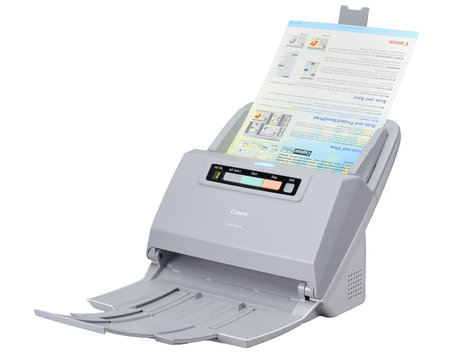
Canon U.S.A, introduced the latest addition to its award-winning imageFORMULA lineup, the Canon DR-M160 document scanner. The Canon DR-M160 scanner has excellent performance and document capacity. Scanning up to 60 pages-per-minute / 120 images per minute, and holding up to 60 sheets in the Automatic Document Feeder, it quickly and effectively captures and stores business information, scanning both sides of a document in a single pass. At less than a foot long and wide, the DR-M160 scanner can help enhance the workflow in space-constrained areas. The Canon DR-M160 scanner includes improved gradation levels and capabilities such as Background Smoothing and Shadow Cropping, for high quality scanning that demonstrates Canon's imaging expertise.
The Canon DR-M160 scanner is bundled with Windows ISIS/TWAIN drivers for easy integration with third-party Enterprise Content Management (ECM) systems. With a combination of performance, convenience and flexibility, the Canon imageFORMULA DR-M160 scanner is a compact document imaging solution that is ideal for a variety of office environments.
To order this scanner please visit our website: http://www.1strunshoponline.com/canondr-m160scanner.aspx
or call us at 212-779-0800.
Friday, August 26, 2011
Total Productivity Solutions from Panasonic
Now all Panasonic V-Models include Kofax VRS Elite version software.


* New User Interface It’s more than just image quality… VRS Elite also improves throughput and efficiency
- Auto Profiles- Automatically applies correct profile at runtime. Train Kofax VRS Elite to apply profiles using Geometric form types. Enable Auto Profile from Kofax VRS Elite tray icon
- Scanner Health Monitoring- Kofax VRS Elite proactively alerts operators of performance issues related to the scanner lamps, feeder, roller mechanism, and other issues that affect image quality and system throughput.
- Fast Production Scanning- VRS Elite uses multiple processes and multiple threads to achieve true asynchronous, parallel image processing.
- Image Processing Upgrades- Added functionality includes: Content based Deskew, Rectangular Hole Fill, Image Merging, Corner Fill, Intelligent Halftone, Manual Crop
The Panasonic Scanner Advantage
Panasonic’s ToughFeed is a group of powerful scanner functions that makes your scanning experience effortless. These functions, including Staple Document Detection, Ultrasonic Double-Feed Detection, Intelligent Feed Control, paired with our Superior Roller Mechanism increase the efficiency of your scanning operation. No worries about damaging your scanner and its inner scan glass, or manual re-shuffling of scanned pages looking for what was lost in a double-feed. It helps your scanner do what a scanner is supposed to do, without any unnecessary interruption. All of our scanners also come with a state of the art Panasonic Image Enhancement Technology that enables your scans to be digitally mastered to meet the highest of quality and image perfection standards.
Click the model number to order online or call us at 212-779-0800.
|
Model Number |
Rated Speed |
Daily Duty Cycle | MSRP | Your Price |
|
| 26ppm | 1000/day | $886.73 | |
|
| 40ppm | 2000/day | $985.51 | |
|
| 24ppm | 4000/day | $1189.79 | |
|
| 43ppm | 6000/day | $2413.26 | |
|
| 90ppm | 15000/day | $3618.21 | |
|
| 67ppm | 10000/day | $4484.18 | |
|
| 75ppm | 10000/day | $4978.06 | |
|
| 65ppm | 30000/day | $5275.51 | |
|
| 80ppm | 30000/day | $5835.61 | |
|
| 75ppm | 15000/day | $6336.22 | |
|
| 85ppm | 50000/day | $7944.65 | |
|
| 100ppm | 50000/day | $8473.36 |
Wednesday, August 17, 2011
New Canon imageFORMULA DR-C125 Document Scanner
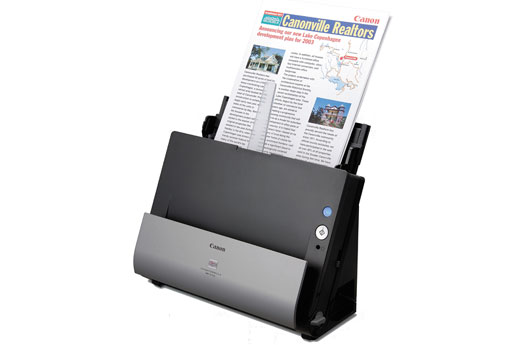
We are pleased to announce the release of the new imageFORMULA DR-C125 document scanner (item # 5005B002AA, MSRP $495). The DR-C125 Document Scanner’s innovative space-saving design makes it a standout in any office environment for improving information accessibility, management, and collaboration. Its flexibility and high image quality are only surpassed by its easy use, making it ideal for converting and capturing paper-based documents to digital format.
DR-C125 User Applications:
The DR-C125 scanner is ideal for general purpose distributed scanning of a variety of document types. In corporate or remote offices, this scanner is well-suited for use by individuals or small workgroups to modernize paper-based processes, increasing efficiency and productivity. Legal services, financial services, healthcare, government, and other sectors can benefit from its small size and easy use.
DR-C125 Highlighted Abilities and Advantages:
• Top feeding and top eject, combined with a unique upright design and side cable routing, for a small operational footprint perfect for space-constrained areas
• Face-up feeding, Full Auto Mode, and both Windows and Mac operating system compatibility for very easy use
• One-of-a-kind “U-turn” path feeding and optional straight feeding to handle varied documents including thick documents, plastic ID cards, and driver licenses, and a Long Document Mode for handling up to 118” documents, for superior flexibility
• Background Smoothing, Auto Resolution setting, and Shadow Cropping for high image quality
• Canon Generation Green program participation, plus RoHS and Energy Star regulatory compliances, for an environmentally conscious solution
• eCarePAK is available for hardware investment protection
• Bundled Canon CaptureOnTouch software allows users to scan directly to cloud applications such as Microsoft SharePoint and Evernote
• ISIS and TWAIN drivers enable easy integration with a variety of third party software applications
Please call us today at 212-779-0800 to order this scanner.
Thursday, August 4, 2011
New Kodak i5800 Scanner
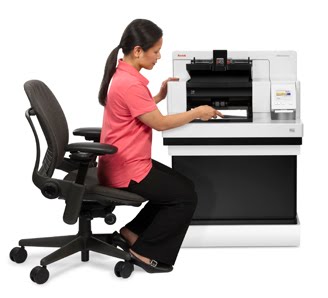
Intelligence and power, on many levels
Part of the Kodak i5000 Scanner Series, the i5800 Scanner delivers up to 210 ppm true performance (with all imaging features enabled), and provides a height-adjustable pedestal, offering the ideal scanning position for every operator.
It’s a better, ergonomically correct answer for superior production scanning, featuring Kodak Dynamic Flow Technology, our breakthrough digital architecture that delivers optimized memory allocation and processing paths. It’s a complete customizable solution aligned with end user business goals – only from Kodak, the high-volume market leader.
— Benefit from intelligence and power on many levels —

Offers the ideal scanning position for every operator —
through a height adjustable transport

Significantly reduces document prep and handling times —
with problem free feeding of diverse batches and controlled stacking
Finds the fastest way to scan, perform imaging
functions, extract data —
via Kodak Dynamic Flow Technology
Improves accuracy with streak filtering —
plus all the additional automated image
enhancement features of Kodak’s Perfect Page
technology

Makes complex and repeat functions one-button easy —
with programmable function keys
For more information and to order this amazing scanner call us at 212-779-0800
Wednesday, July 6, 2011
Xerox DocuMate 4440 - Document scanner - Duplex

| The DocuMate 4440 is a fast and easy to use scanner that enables users with an effective way to greatly reduce paper chaos, storage requirements, and security risks associated with unorganized paperwork at home or the office. The DocuMate 4440 is packed with features that will change how you look at and manage paper documents and information. |
| Main Specifications |
| General | |
| Type | Document scanner - desktop |
| Max Supported Document Size | 8.5 in x 38 in |
| Width | 11.6 in |
| Depth | 12.8 in |
| Height | 15.7 in |
| Weight | 7.9 lbs |
| Scanner | |
| Input Type | Color |
| Grayscale Depth (External) | 8-bit (256 gray levels) |
| Color Depth (External) | 24-bit (16.7 million colors) |
| Optical Resolution | 600 dpi |
| Scan Mode | Single/duplex pass |
| Automatic Duplexing | Yes |
| Scan Element Type | Dual CCD |
| Max Document Scan Speed B/W | 40 ppm |
| Max Document Scan Speed Color | 40 ppm |
| Duty Cycle | 3000 scans per day |
| Scanner Speed Details | 80 ipm - duplex black&white (back) 200 dpi (back) 80 ipm - duplex color (back) 150 dpi (back) 40 ppm black&white (back) 200 dpi (back) 40 ppm color (back) 150 dpi (back) |
| Scanner Features | Visioneer OneTouch with Kofax VRS Technology |
| Compliant Standards | TWAIN, ISIS, WIA |
| Media Handling | |
| Max Document Size | 8.5 in x 14 in |
| Supported Document Type | Plain paper |
| Supported Document Size Details | ADF - up to 8.5 in x 38 in Flatbed - up to Legal (8.5 in x 14 in) |
| Document Feeder Type | Autoload |
| Feeder Capacity | 50 sheets |
| Expansion / Connectivity | |
| Interfaces | 1 x Hi-Speed USB - 4 pin USB Type B |
| Miscellaneous | |
| Cables Included | 1 x USB cable |
| Environmental Standards | |
| ENERGY STAR Qualified | Yes |
| Power | |
| Power Device | Power adapter - external |
| Power Consumption Operational ( Standby ) | 30 Watt ( 5 Watt ) |
| Software / System Requirements | |
| Software Included | Kofax VirtualReScan, Nuance OmniPage Professional, Nuance PaperPort, Visioneer OneTouch |
| OS Required | Microsoft Windows XP SP2, Microsoft Windows 7, Microsoft Windows Vista |
| System Requirements Details | Windows XP SP2 - Pentium 4 - RAM 512 MB - HD 350 MB Windows 7/Vista - Pentium 4 - RAM 1 GB - HD 350 MB |
| Manufacturer Warranty | |
| Service & Support | 1 year warranty |
| Service & Support Details | Limited warranty - 1 year Product info support - web support Technical support - phone consulting |
Saturday, May 21, 2011
Kodak designs in-store scanning system

Kodak has designed a walk-up photo scanning system to give libraries, specialty retailers and other photo-intensive retail environments an opportunity to provide new client services and revenue streams.
According to a press release, the Kodak Picture Saver Scanning System PS450 allows for photographic prints and memorabilia to be converted into digital files for photo books, digital slide shows, digital frames, online albums and sharing sites, and social media.
The system expands Kodak's growing family of professional batch photo scanning systems, which include the PS410 and PS810, and offers new revenue potential for organizations wishing to provide a self-serve photo conversion service. According to the release, the PS450 uses easy and intuitive workflow software that guides the consumer and tracks order amounts as they scan and enhance their images. Administrator functions enable control over settings including customer output, image enhancement, prices and taxes. Libraries can benefit from a customized photo solution that addresses the opportunity for self-funding, while increasing customer engagement in their communities.
Kodak tested units at a number of public libraries, including the Liverpool Public Library in Liverpool, N.Y., near Syracuse, N.Y. Librarians and patrons used the systems in everyday situations to gauge ease of use and applicability of the payment methodology.
"Libraries and retail shops can now provide patrons with an easy way to preserve printed memories," said Andre Bailey, worldwide product manager, Kodak Capture Systems, Kodak's Business Solutions and Services Group. "Kodak has created an optimal photo scanning experience easily adopted by both experts and novice users."
PS450 Features
Through its Kodak Gentle Photo Handling feature, the PS450 scans up to 30 pictures per minute at a resolution of 300 dpi. Image-enhancing features include Kodak Perfect Touch Technology, red-eye removal, auto-deskew, auto-cropping, image rotation and auto-sharpening. Optional A3 (tabloid) and A4-size (letter) flatbed scanners are available for bound, fragile or oversize materials. Once scanned, the included Kodak Picture Saver Scanning Software enables users to seamlessly burn images to a variety of media, including CD, DVD, Kodak Picture CD and portable USB drives. Payment is enabled by an included tabletop device that accepts major credit and debit cards.
Additionally, the PS450 can be leveraged through the administrator as a document scanner, via Kodak's Smart Touch feature (installed and managed separately from the PS450 software) for customizable one-touch scanning to a user's destination of choice. The administrator can create PDF, TIFF or JPEG files and email to a recipient or save them to the chosen storage media.
In the press release, Jeanine Thiemel, worldwide portfolio director of Capture Systems for Kodak's Business Solutions and Services Group, said, "Photo scanning systems represent a significant revenue opportunity for all types of organizations. Business owners, like retailers, can capitalize on solutions that drive traffic to their stores and monetize photo collections in new ways, while libraries can tap into a resource that attracts new members of the community—like artists, photographers, historians, and others. "
The PS450 comes equipped with a Scanning Event Promotion Kit, including marketing materials to assist with the promotion of the new service to clients. Materials include both electronic and print formats to quickly engage new clients.
For details visit our store or call (212) 779-0800
***article from http://www.selfserviceworld.com
Subscribe to:
Posts (Atom)