Wednesday, April 13, 2011

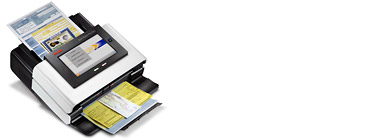
New Xerox DocuMate 4799 and 4790 Document Scanners


Xerox' experience in the field of office equipment and peripherals is unquestionable, and for this reason, the launch of any new such item is quite noteworthy, as is the case with the company's latest document scanners, models DocuMate 4799 and DocuMate 4790.

Both new scanners target the busy enterprise environment, and in order to meet the needs of busy offices, the Xerox DocuMate 4799 has been equipped with three advanced sensor systems, including here ltrasonic double feed detection, stapled document detection and intelligent feed control.

With the help of the aforementioned technologies, plus its advanced built-in imaging engine, the scanner ensures users that they'll be able to automatically scan documents of various types and sizes at very high speeds, of up to 100 pages per minute.

Next in line comes the Xerox DocuMate 4790 model, capable of scanning an impressive 10,000 pages per day, at some pretty OK speeds, of up to 90 pages per minute.

The device is quite easy to work with and user-friendly, due especially to the fact that it comes packed with an easy-to-read LCD screen with resolution, color mode, file type, processing and final destination of the scanned document.

It's also important to mention that both models will come bundled with a wide array of software applications designed to enable a higher level of productivity, including here Visioneer OneTouch with Kofax VRS technology, TWAIN, EMC Captiva ISIS and WIA drivers, Nuance OmniPage Pro and Kofax VRS Professional AIPE-EBC, just to name a few.

Visit our store at :www.1strunshoponline.com or call us at (212) 779-0800


**from http://news.softpedia.com

Thursday, March 31, 2011

New Kodak Scan Station Pro 550 Network Scanner


KODAK Scan Station Pro 550 is a simplified one touch solution that automates data and transaction capture to feed your business process. It will provide the ability to be tailored to fit specific job requirements so that it will scan documents, extract key indexing information, enhance selected images, and forward the document image and metadata to a designated repository or business application, all with the push of a single button.
  • Automatically capture transactional documents and data, and kick off time-critical processes

  • Initiate and feed a wide array of processes – accounts payable/receivable, insurance claims, storage/receiving, shipping, estimates/offers, new patient registration, patient records/updates, and many others
Technical Specifications

Connectivity 10/100 Base T

Networking TCP/IP, DHCP or static, NT domain authentication

Interfaces

Rear panel – four USB 2.0 ports, 100 Base T Ethernet port,

one custom flatbed port. Bezel – one USB 2.0 port

Dimensions Depth: 38.1 cm (15 in.); Width: 34.9 cm (13.8 in.); Height: 20.8 cm (8.2 in.)

Feeder Up to 75 sheets


To order this scanner, call us at (212) 779-0800

Monday, March 21, 2011

Kofax Express 2.5 | Released


Kofax released the Kofax Express 2.5. This latest release of Express includes significant advances in indexing and administration.

Zonal OCRKofax Express automatically extracts index field data from documents. Users can train Kofax Express to locate the key index information in a document and Kofax Express will automatically remember that location and extract the data from future documents, which reduces the time it takes to process documents and makes indexing much easier for users.

Rubber Band IndexingKofax Express users can now easily index documents by selecting the text in the document with their mouse. Kofax Express automatically populates the index field with the information highlighted by the user, saving keystrokes and making the indexing of documents faster and easier.

Integration with Microsoft SharePoint and Other SystemsTight integration with Microsoft SharePoint enables Kofax Express to index, classify and deliver documents and data into SharePoint for easy and fast retrieval. Kofax Express also supports direct integration with Kofax Capture and provides an export API for custom or advanced export use cases.

To order call us at 212-779-0800

Saturday, March 12, 2011

New Kodak i5600 Scanner


The KODAK i5000 Series Scanners will help enterprise and service bureau organizations increase their production level capture performance through optimized accuracy and automated functionality—resulting in an impressive total cost of ownership. Designed for the most diverse job streams within high-volume document environments, these new scanners provide more usable information in black and white, color or dual stream at rated speeds to digital mail rooms and document processing operations found within financial, insurance, legal and government organizations.


The i5000 Series Scanners support key customer priorities to feed more accurate information and images into a business process for action or archiving at rated speeds. Greater automation is provided through programmable function keys for job customization, requiring less operator interaction with the host. The i5000 Series Scanners have advanced capabilities in equipment intelligence, including memory optimization for increased processing power and better optical resolution capture without sub-sampling or simple interpolation of dpi to better enable Intelligent Document Recognition (IDR) and improved data extraction. Overall, the scanners’ image processing and paper handling improvements, including streak filtering and controlled stacking, greatly reduce re-scans and sorting to provide enhanced productivity.


Specifications for Kodak i5600
Throughput: 170 ppm
Recommended Daily Volume: No limit with i5000 Series Scanners
Scanning Technology: CCD
Optical Resolution: 600 dpi
Output resolution: 100 / 150 / 200 / 240 / 300 / 400 / 600 dpi
Illumination: White LEDs
Maximum Document: Width 304.8 mm (12˝)
Long Document Mode Length Up to 4.8m (189˝)
Minimum Document Size 63.5 mm x 63.5 mm (2.5˝ x 2.5˝)
Paper Thickness and Weight With standard feeder: 45 g/m2 (12 lb.) bond to 200 g/m2 (110 lb.) index
With ultra-lightweight feeder accessory: 25 g/m2 (7 lb.) rice paper to 75 g/m2 (20 lb.) bond
Feeder/Elevator: Automatic 750-sheet elevator design; automatic document feeder with four settings: continuous feed, 100-sheet, 250-sheet, 500-sheet and full 750-sheet batches
Multi-feed Detection: 5 independent ultrasonic zones
Connectivity: USB 2.0
Interface Support: TWAIN, ISIS and WIA drivers, Kofax certified
Features in the Scanner Perfect Page Technology, streak filter, controlled stacking, iThresholding, automatic color detection, autocrop, aggressive crop, deskew, content-based blank page detection and deletion, multi-color dropout, dual-stream scanning, automatic orientation now with defaults, color on the fly toggle patch, operator overrides
Output Compression: CCITT Group IV; JPEG or uncompressed output
Electrical Requirements: 100-240 V (international), 50/60 Hz
Power Consumption Sleep Mode: < 4 watts; Running: 215 watts; Standby: <1.0 watt
Environmental Factors 2009 Energy Star qualified scanners, 2008 EuP, proposed 2013 EuP
Acoustical Noise Sound Power Level: Operating < 70 dB; off mode or ready mode < than 54 dB
Recommended PC Configuration Microsoft Windows XP – P3 1 GHz, 1 GB RAM, USB 2.0; Microsoft VISTA – P4 1 GHz, 1 GB RAM, USB 2.0;
Microsoft Windows 7 – P4 1 GHz, 2 GB RAM, USB 2.0
Supported Operating Systems Microsoft Windows XP (32- and 64-bit);
Microsoft Windows Vista (32- and 64-bit); Microsoft Windows 7 (32- and 64-bit)
Consumables Available Feeder consumables kits, imaging guide set, printer ink cartridge and carrier, transport cleaning sheets, roller cleaning pads, printer ink blotters, Staticide Wipes, switchable black/white background
Accessories/Options Enhanced Printer Accessory for Kodak Scanners, i5200 to i5600 upgrade, manual feed shelf, Document Extenders 66.04 cm, 76.02 cm and 86.36 cm (26˝, 30˝ and 34˝)
Dimensions Height: 43.4 cm (17.1˝); Width: 69.3 cm (27.3˝); Depth: 51 cm (20.1˝) with tray closed, 65.3 cm (25.7˝) with tray open
Weight 57.6 kg (127 lbs.)

Call us at :(212) 779-0800 or visit our website http://www.1strunshoponline.com

Friday, March 4, 2011

New Kodak i5200 Scanner


Beyond smart lies brilliant: a revolution in document imaging intelligence, only from Kodak

Kodak – the high-volume market leader – delivers brilliant, never-before-possible advantages for your enterprise with Kodak i5000 Series Scanners.

Breakthrough digital architecture offers logic and programmability delivering advantages for today and tomorrow – including optimized memory allocation and processing paths, and customization capabilities for your job streams

Load any mix of diverse documents and your i5000 Series Scanner will find the fastest way to scan, perform imaging functions, extract data and neatly stack originals.


Best-in-class total cost of ownership/performance
Process and manage more data per dollar – up to 33% more accurately – than select competitors, even with all imaging features enabled*.

Give your documents the intelligence they deserve
Greatly increase processing volume and accuracy to make informed decisions faster, speed up a business process, and deliver better customer service. It’s intelligence and power for your documents and enterprise, designed for less human interaction from feeding, through imaging, to stacking.

No lag, full-rated speed of 140 ppm with all imaging features enabled.

Upgrade without additional hardware purchases
Field upgradable versatility and savings – transform a Kodak i5200 Scanner to Kodak i5600 Scanner specs and performance as volumes grow.

Single component, touchscreen panel efficiency
Make repeated and complex functions one-button easy – simplify tasks, according to common job orders, with programmable function keys to minimize human interaction while improving accuracy and processing times

Wide-angle viewing with two ergonomically correct positions – vibrant, full-color touch screen

Call us at :(212) 779-0800 or visit our website http://www.1strunshoponline.com

Friday, February 25, 2011

New Fujitsu ScanSnap N1800 Network Scanner


Fujitsu Introduces New ScanSnap Network Scanner Incorporating Enhanced Tools to Increase Workplace Efficiency
Ease of use, effective device deployment and additional document security features highlight the ScanSnap N1800 Network Scanner

Sunnyvale, CA, February 22, 2011 — Fujitsu, the market leader in document imaging scanners, today introduced the Fujitsu ScanSnap N1800 Network Scanner designed to simplify document collaboration for all types of organizations, including small and midsize businesses (SMBs), groups within an enterprise and across the front office to the back office. The latest network scanner added to the award-winning line of Fujitsu ScanSnap scanning solutions offers new tools to make digitizing documents simple and specialized training unnecessary, enhanced security features to combat the threat of data compromise, and added flexibility to easily create customizable interface screens for a consistent user experience. Fujitsu will be giving hands-on demonstrations of the ScanSnap N1800 Network Scanner at the Annual HIMSS Conference & Exhibition (Booth #5750) in Orlando, Feb. 22-24, 2011.

The Fujitsu ScanSnap N1800 Network Scanner seamlessly integrates within a company’s existing network infrastructure allowing users to easily scan and share information on the network to streamline business operations, reduce operating costs, and enhance work processes. Furthermore, over the past few years, the adoption of network scanners has gained tremendous momentum by helping organizations decrease the complex nature of scanning without compromising access to important document scanning functionality. Key features of the ScanSnap N1800 Network Scanner include:

Fast Scanning Speeds: 20 pages per minute (ppm) and true double-sided scanning speeds at 200 or 300 dots per inch (dpi) in black & white, grayscale or color mode enables for quick digitizing of documents and helps to improve Optical Character Recognition (OCR) accuracy without compromise.
Ease of Use: The ScanSnap N1800 is equipped with a new Interactive Help feature for quick and easy installation as well as operation. Additionally, the new Installation Wizard provides a simple way to install the network scanner by providing step-by-step configuration screens to get the scanner operating quickly.
Customized User Experience: Utilizing its "Job Button" feature, unique menus and buttons based on user login can be easily created for frequently used functions by users, including setting multiple fixed destinations with pre-determined scanner settings.
Large Touch-Screen Display: With its 8.4” XGA touch-screen display and a high resolution of 1024 x 768 pixels, users can easily preview scanned images in outstanding image detail before sending them to the desired destination. In addition, users can zoom, pan and rotate scanned images, delete pages or scan more pages to a batch by adding more pages to the 50 page automatic document feeder.
Scan-to Functions for General Office Use: The ScanSnap N1800 offers users easy access to valuable business functions traditionally found on multiple devices through one common interface, including scan to e-mail, scan to folder, scan to network fax or network printer, scan to FTP, and scan to Microsoft SharePoint.
Network Scanner User Editor for Local Scanner Accounts: The Network Scanner User Editor is a new software utility which allows for the creation of e-mail lists as well as user accounts either offline or directly on the ScanSnap N1800. Scanner operators can manage e-mail groups, lists and addresses with ease.
Improved Security & Compliance: Adding to an already feature-rich network scanner security platform such as support for Secure Protocols (SSL) and Encryption, the ScanSnap N1800 incorporates several new security-specific features such as Secure Initialize and Install Certificates to offer organizations additional measures to assist with compliance and regulatory issues, as well as ensure data security.
“We’re seeing many companies in paper intensive vertical markets such as healthcare, government, banking and education embrace network scanning to help them improve their business process management and efficiency and reduce their overall workplace costs,” said Therasa Bell, chief architect of the distributed clinical scanning module, Inofile, and President at Osmosyz, Inc. “Organizations are realizing that deploying a network scanning strategy is quite simple and the learning curve to quickly scan and share documents across the entire organization is minimal. We consistently receive feedback from our customers that have transitioned to a network scanner, that the fast scanning speeds, compact size and ease of use has allowed them to streamline their document capture workflow. Fujitsu’s innovative network scanners provide a perfect delivery vehicle for our Inofile solutions in healthcare and document management and the ScanSnap N1800 Network Scanner will delight our customers.”

“It’s been exciting to see the rapid adoption of network scanning over the past few years,” said Scott Francis, vice president of marketing, Fujitsu Computer Products of America, Inc. “From general users to network administrators and business managers to essentially an entire organization, businesses in a wide variety of markets are benefiting from network scanning enhancing their work processes. We’ve worked closely with our customers to incorporate new features and functionalities into the ScanSnap N1800 Network Scanner and look forward to building on the momentum we have sustained since we launched our first network scanner.”

More Innovative Features of the Fujitsu ScanSnap N1800 Network Scanner
With the ScanSnap N1800 Network Scanner Central Admin Server, network administrators can control their entire fleet of ScanSnap network scanners, including the ScanSnap fi-6010N and the N1800, via one administration console. It’s easy to push software updates to remote scanners to keep devices current, and administrators can track device status and consumable counts from anywhere to maintain optimal performance. Additional features include:

Intelligent Document Processing: Loaded with a full suite of automatic scanning features, the ScanSnap N1800 automatically detects the page size and page orientation, will automatically recognize a document as color or black & white and automatically deletes blank pages. All of these intelligent scanning features including automatic deskew and cropping of the scanned image, which are enabled by default, affords users the ability to create perfect images the first time scanned without rescanning, right out of the box.
Compact Design: The network scanner’s small footprint (11.8” W x 8.9” D x 6.8” H) allows for convenient placement in any front office or back office environment.
Quiet Operation: Low operational noise, standby and sleep mode make the ScanSnap N1800 ideal for both small business and enterprise environments.
Scanning Versatility: Long document scanning support (up to 120 inches) and mixed document handling of pages of different sizes and colors are all included as standard features on the ScanSnap N1800.
ScanSnap N1800 Network Scanner Software Development
The Fujitsu ScanSnap N1800 Network Scanner also offers developers an optional ScanSnap N1800 Software Developer Kit (SDK) Bundle, which allows software developers to create connectivity and customize the Network Scanner interface screens to the exact business need. For added business productivity, many optional third-party applications have already been developed which extend additional functionality of the ScanSnap N1800 to connect to Enterprise Content Management (ECM) repositories, Line of Business (LOB) applications or other third party systems.

* from www.fujitsu.com

Thursday, February 17, 2011

Fujitsu Refurbished Scanners


Refurbished equipment products have been completely restored by qualified technical staff and can be upgraded by purchasing post-warranty service contracts. All conditions such as warranty and returns apply to the purchase of refurbished units.
Check out our eCommerce website:
http://www.1strunshoponline.com/refurbished_fujitsu.aspx
or call us ta 212-779-0800